Browser sharing · No account required
Share clipboard text between your devices
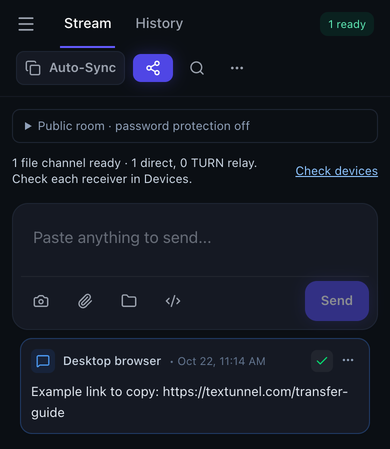
To copy text from a phone to a computer, open the same Textunnel room on both devices, paste into the composer and press Send. On the received message, press Copy, then paste into the destination app. No transfer-app installation or account is needed. Optional Auto-Sync depends on clipboard permission and page focus.
Send text to another device
Choose files or connect your devices to begin. Keep both pages open during transfer.
Direct-first · Internet relay needs permission
How to use it
- Open the same room on both devices. Set a room password before sharing sensitive text, especially if considering content relay.
- Paste text, a link or code into the composer and press Send. Messages have a 64 KiB encoded limit.
- Use Copy on the received message, then paste into the destination app. Verify the pasted content.
- For Auto-Sync, enable it on both devices and allow requested clipboard access. Keep both pages active; use manual Copy if automatic access is unavailable.
Start with Send and Copy
Copy the URL, note or code on the source device and paste it into the room composer. Send it after the other device connects. Check the received message on the destination, choose Copy, and paste into the app where you need it. Send works in either direction.
Use a short non-sensitive phrase for the first check. Compare the pasted result rather than relying only on a notification. If the receiving browser cannot write to the system clipboard, select and copy the received text manually.
Text messages have a 64 KiB encoded byte limit. Emoji and non-Latin text can use more than one byte per character. Save longer text as a file instead of treating the limit as a fixed character count.
When Auto-Sync needs an extra tap
Enable Auto-Sync on both devices only when you want to share their clipboard content. A browser may ask for clipboard access or require a tap before reading or writing. Keep the pages visible and active; this is not a background clipboard service for every app.
A shared or sent notice concerns the outgoing content. It does not confirm that the other system clipboard changed. Paste into an empty field on the receiving device to check. If access is denied or nothing changes, return to manual Send and Copy; do not repeatedly retry an already successful copy.
Room messages can remain in local browser history. For credentials, use your password manager's sharing feature rather than treating this room as a secret vault. Set a room password before considering MQTT relay, and review the privacy explanation below.
What to check in the room
Limits and connection conditions
On physical iPhone Safari, manual text sharing and a bidirectional clipboard round trip were checked. That does not establish unattended background clipboard synchronization across all apps or browsers.
- Text and clipboard messages: 64 KiB encoded message limit
- Use a file for larger content. Clipboard permissions and foreground access still apply.
- MQTT file fallback: 25 MiB per file
- Both peers must explicitly allow relay in their current tabs.
WebRTC transport is encrypted. Public-room MQTT content needs a room password for encryption against the broker. Internet content relay requires explicit permission in each tab. History and optional recovery use device storage; the site also uses analytics and advertising scripts.
Privacy, relay permission and full transfer guideVerified transfer workflows
Maintained by the Textunnel team · Content reviewed 2026-11-04 · Physical acceptance record: October 18, 2026
Physical iPhone Safari checks covered manual text exchange, clipboard paste-back and system share cancellation. Clipboard round-trip content matched; background Auto-Sync is not guaranteed.
These checks confirm the tested workflows, rather than a fixed transfer speed. For interrupted transfers, return to the page, reconnect and ask the sender to Retry.
Detailed transfer test resultsFrequently asked questions
Does Auto-Sync work everywhere in the background?
No. Browser permissions, user gestures, focus and phone background rules affect clipboard reads and writes. A shared notice does not prove the other system clipboard changed. Manual Send and Copy remain available.
Can I share a large document through the clipboard?
Text and clipboard messages have a 64 KiB encoded limit. Save larger content as a file and use file transfer instead. The encoded byte limit is not a fixed character count.
Is clipboard content private from the broker?
Direct WebRTC transport is encrypted. If you explicitly allow MQTT content relay in a public room, use a room password for payload encryption against the broker. Room codes, passwords and share links must be kept private.